
MarqueDown
This website is powered by MarqueDown, a lightweight site engine written in C++17 by Privateer Systems. The name is a play on Markdown (MD) (which is a lightweight plain-text formatting language that uses simple symbols to structure text—such as headings, lists, links, and emphasis - so it can be easily converted into formatted documents like HTML), our version which assembles a whole website out of those simple files, and letters of Marque which were Privateering licences.
How it works
Content is authored in Markdown and stored in a git repository. When a commit lands, MarqueDown renders every page through HTML templates and writes the result as ordinary files on disk — HTML, CSS, images, RSS feed, sitemap and search index. Apache serves that directory. Nothing is rendered while a visitor waits.
Building this site takes 0.18 seconds on the ARM board that hosts it. All three sites we run — 268 pages between them — take 1.4 seconds and 8.5 MB of memory, and then the process exits. Between builds there is no engine running at all.
There is no database, no CMS, and no JavaScript framework.
Features
- Markdown with includes — pages can pull in shared text blocks, reducing repetition across the site
- Template inheritance — a base layout is extended by specialised templates for blog posts, listings, and other page types
- Navigation menus — defined in a simple text file with nested includes; the current page is automatically highlighted
- Blog listings — a directory of Markdown files becomes a date-sorted blog with thumbnail images, summaries, and RSS feed
- Image pipeline — source images are automatically resized into multiple widths with responsive
srcsetattributes - Git integration — a push to the repository rebuilds the site and swaps the new version into place, with no manual build step and no deployment tooling to maintain
- Categories and tags — hierarchical categories and flat tags, defined in a plain text file; archive pages are generated automatically for every term
- Search — a JSON index is built with the site and filtered in the browser, so search works with no server, no database and no third-party service
- Multilingual — a site can be published in several languages, each with its own navigation, listings, feed and categories, and articles cross-link to their translations
- Custom permalinks — a page can declare the exact URL it serves at, so content imported from another system keeps its existing addresses
- Live preview — a built-in development server watches for file changes and refreshes the browser automatically and a VSCode Extension makes life easy
Performance
To put a page request in context: a typical WordPress request involves PHP execution, multiple database queries and plugin hooks — often 200-500 ms even with caching plugins. MarqueDown does none of that work when you ask for a page, because the page already exists. Apache reads a file and sends it.
A static site generator such as Hugo or Jekyll reaches the same place, and the difference is what happens between writing a sentence and it being live. Those tools give you a build step somebody has to run, and a deployment somebody has to wire up. MarqueDown is that step: push to git and the site rebuilds itself and swaps the new version into place, unattended, in about eight seconds end to end — fetch, render, check every internal link, and publish.
Earlier versions of MarqueDown held the whole site in memory and served it over FastCGI, which was genuinely fast but made the engine part of every request. That was the wrong trade and we changed it. A rebuild could land on an unlucky visitor and make them wait for it. A mistake in a config file could stop a process that three sites depended on at once. Building to disk removes the entire category: whatever the builder does — crash, run long, fail on bad content — the last good version of the site carries on being served.
Publishing is a single atomic operation, so there is no moment when a site is half-updated. We measured this by hammering all three sites with 1200 requests while forcing a full rebuild and swap of every one of them: no request failed. Rolling back to any of the last five builds is the same operation in reverse, and takes effect immediately.
The whole thing runs on a low-power ARM board alongside our other services.
Architecture
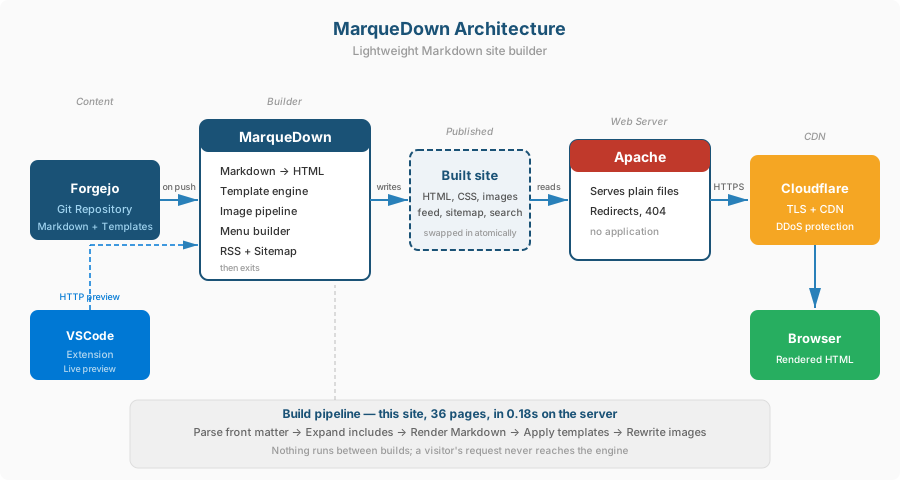
The stack is deliberately minimal, and nothing in the serving path is ours:
- Content — Markdown files in a Forgejo git repository
- Builder — MarqueDown, run out of band; it writes a directory and exits
- Web server — Apache serving that directory as plain files
- CDN — Cloudflare for TLS, caching, and DDoS protection
Each build is written to its own directory and published by repointing a single symbolic link, which is why publishing is atomic and rollback is instant. Unchanged files are shared between builds, so keeping the last five costs little more than keeping one.
Markdown formatting
MarqueDown uses GitHub Flavoured Markdown (cmark-gfm) with these extensions:
| Syntax | Result |
|---|---|
# Heading to ### Heading |
Headings (H1 to H3) |
**bold** |
bold |
*italic* |
italic |
~~strikethrough~~ |
|
[text](url) |
Link |
 |
Responsive image with srcset |
 |
Image at specific width |
 |
Thumbnail (300px) |
- item |
Bullet list |
1. item |
Numbered list |
`code` |
Inline code |
``` block ``` |
Code block |
> quote |
Blockquote |
--- |
Horizontal rule |
| Pipe tables | Tables (as on this page) |
text[^1] and [^1]: note |
Footnotes with return links |
| Bare URLs | Auto-linked |
Template and include syntax
| Syntax | Context | Description |
|---|---|---|
<<file.md>> |
Markdown pages | Include shared text block from _includes/ |
{{extends base.html}} |
Templates (first line) | Inherit from parent template |
{{include footer.html}} |
Templates | Include a template fragment |
{{variable}} |
Templates | Substitute a front matter field or auto variable |
{{blog_list blog/ 20}} |
Templates | Generate date-sorted blog listing |
{{category_links}} |
Templates | The current page's categories, as links |
{{tag_links}} |
Templates | The current page's tags, as links |
{{category_tree}} |
Templates | The whole category hierarchy, nested, with article counts |
{{tag_list}} |
Templates | Every tag, flat, with article counts |
{{translation_url}} |
Templates | URL of this article in the other language |
{{hreflang_links}} |
Templates | Search-engine language alternates |
Front matter
Each page starts with YAML-style metadata:
---
title: Page Title
date: 2026-03-14
template: blog_post
summary: Short description for listings and RSS.
image: thumbnail.jpg
permalink: /an/exact/url/
categories: governance, transparency
tags: planning, review
lang: en
translation_key: shared-key
---
The title, summary, and any custom fields become template variables.
template selects which HTML template to render through (defaults to
base). date is used for blog sorting. image provides a thumbnail
for blog listings.
permalink sets the exact URL a page serves at, overriding the one derived
from its filename — this is what lets content imported from another system
keep its existing addresses. categories and tags are lists of slugs
defined in _includes/categories.def and _includes/tags.def. lang and
translation_key group an article with its translations.
Auto-generated variables available in templates: {{content}} (rendered
page body), {{year}} (the year the site was built), {{menu}} (navigation
HTML), {{performance}} (how long this page took to render during the build).
Categories and tags
Categories nest; tags do not. Both are declared in a plain text file, with two-space indentation for nesting:
- governance                Governance
  - transparency            Transparency
  - code-of-conduct         Code of Conduct
- planning                  Planning
Pages then reference them by slug. The engine generates an archive page for
every term — /category/governance/transparency/ and /tag/planning/ — and
a page filing itself under a term that no definition declares is a build
error rather than a link that quietly 404s.
{{category_tree}} renders that whole hierarchy as nested lists, each term
linked to its archive and followed by the number of articles that archive
lists — its own, not a roll-up of its children, so the count never disagrees
with the page it labels. {{tag_list}} does the same for the flat kind. Both
are available on every page and are built from the same definition file the
archives are, so a browse page cannot drift from what it points at. A leading
! on a slug hides a term from all of that — the tree, its parent's child
links, the posts filed under it, and the sitemap — while still building its
archive, so a link that already points there keeps working.
A definition file that could not produce a sound URL is refused when it loads, rather than producing a page at a broken address: a slug is held to the characters that are safe in a URL and in a directory name, a flat kind may not nest, and nothing may nest deeper than an archive URL can carry.
Nothing generates a page at /category/ or /tag/ itself: the browse page is
ordinary content, with its own title and prose in its own language, so it
claims whatever URL the site wants and a redirect points the archive parents at
it. The build says so on stderr when neither a page nor a redirect claims one,
rather than leaving a 404 nobody looks for.
Search
Search is built at render time into a JSON index and filtered in the browser.
There is no search server, no database and no third-party script: the index
is a static file like any other page, and it compresses to well under 50 KB
for a site of a hundred articles. Accents are folded on both sides of the
comparison, so an unaccented query still finds accented text — searching
zeleznice finds železnice.
Multiple languages
A multilingual site keeps each language in its own directory and gets a
separate navigation menu, blog listing, feed, search index and set of
categories per language. Articles are linked to their translations by a
shared translation_key, which gives each page a link to its counterpart and
generates the reciprocal hreflang metadata search engines expect —
including x-default pointing at the site's primary language.
Image pipeline
Source images placed in _images/ are automatically resized to multiple
widths (300px, 600px, and full size) and written to static/img/ with
responsive srcset attributes. Supported formats: JPEG, PNG, and GIF.
Generated pages
- /feed.xml — RSS feed built from blog posts (requires
site_urlin config) - /sitemap.xml — sitemap of all pages with last-modified dates
- /search-index.json — the search index, one per language
- /search/ — the search page, if a
search.htmltemplate exists - Category and tag archives — one page per term, nested to match the category hierarchy
- 404 page — always written, so a missing page never falls through to the web server's default; a site can replace it by adding
pages/404.md - Redirect map — the parsed
_redirectsfile, written beside the pages for the web server to serve from
Redirects
A _redirects file maps old URLs to new ones with 301 permanent redirects:
/old-wordpress-url    /new-page
/2024/03/legacy-post  /blog/2024-03-15-new-post
The build writes these out with the pages, exactly as it parsed them, so the web server redirects precisely what MarqueDown understood — and a rollback takes the redirects back with the content they belong to.
Safety
All recursive expansion paths are protected against runaway loops:
- Markdown includes (
<<file>>) — canonical path stack detects cycles (A includes B includes A), with a hard depth limit of 32 levels - Template extends (
{{extends parent.html}}) — name stack detects inheritance cycles across template chains - Template includes (
{{include file.html}}) — shares the extends stack so cross-cutting cycles between extends and includes are also caught, with a depth limit of 16 levels - Menu includes — same canonical path stack and depth limit as Markdown includes
If a cycle or excessive depth is detected, the engine returns a clear error identifying the offending file rather than looping indefinitely.
Why not WordPress?
This site was previously a WordPress installation. MarqueDown replaces it with something simpler, faster, and more secure:
- No PHP, no MySQL, no plugins, no updates
- The engine is not exposed to the web at all. It is not a service and it does not listen on anything: it runs from a timer, writes a directory of files and exits. What a visitor can reach is Apache, serving files
- Content versioned in git with full history, and any earlier build restorable in seconds
- The entire site is a handful of Markdown files anyone can edit
This epitomises our approach to engineering. Efficient, secure, simple.